Custom Neon Sign for Gaming Setup Decor
Custom Neon Sign for Gaming Setup Decor
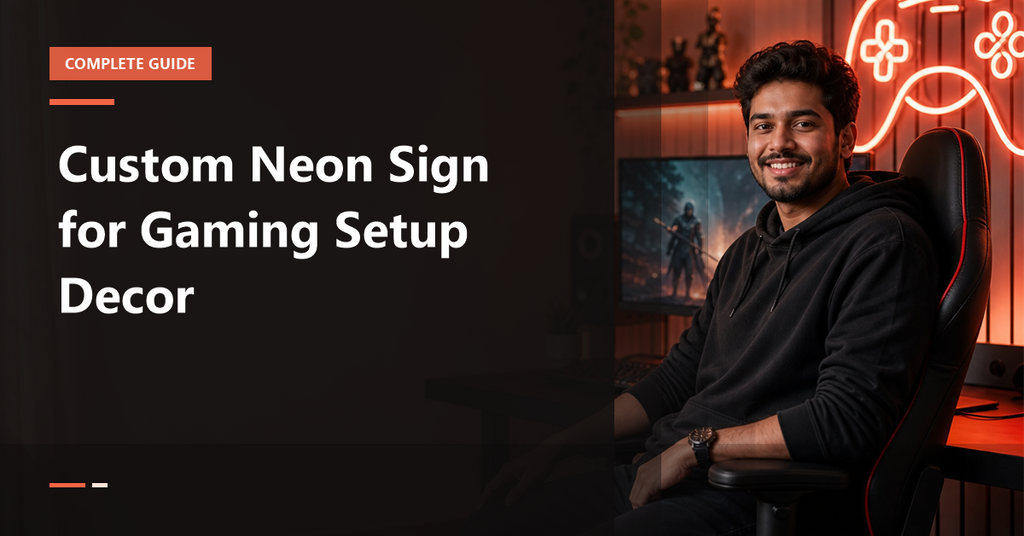
If you want your gaming corner to look polished, camera-ready, and personal, a custom neon sign for gaming setup decor is one of the easiest upgrades you can make. It adds identity to your battlestation, creates a focal point for streams, and makes even a small desk feel intentional.
You do not need a full room makeover. This guide focuses on practical choices for Indian homes, compact bedrooms, and modern gaming rooms.
A neon sign works best when it feels like part of the setup, not a random wall piece.
What makes a neon sign work in a gaming room?
A gaming room is about mood, brand, and focus.
Compared with generic wall art, a custom neon sign can show your gamer tag, a short phrase like Game On or Player 1, a controller icon, or a logo that reflects your style.
If you are exploring customization basics, it helps to read custom name neon sign buying guide and right size, color, and style चुनना before finalising your design.
For gaming rooms, short text usually looks better than long quotes.
Best sign ideas for gaming setups
The most effective gaming neon is the one that feels personal and is readable from a distance. Keep the message short and the shape clear.
Gamer tag and name signs
For a battlestation, your gamer tag is often the strongest choice. It gives the setup a creator identity, especially if you stream or post clips online.
Game icons and console-themed signs
Icons are simple, stylish, and easy to place in smaller rooms. Popular options include PlayStation icons, a controller icon, a headset symbol, or a simple badge.
Motivational phrases like Game On or Level Up
Short phrases are ideal when you want the wall to feel energetic but not too busy. The best phrases are two to three words long, easy to read, and visually balanced.
- Game On
- Level Up
- Player 1
- Respawn
- Do Not Disturb
DND / streamer mode signs
A DND or Do Not Disturb sign is smart for bedroom gaming corners. It is practical, fun, and gives the room a clear social cue. Streamers also like this style because it feels like a personal brand statement.
The more words you add, the smaller and less impactful the sign becomes.
How to choose the right size
Size is where many buyers get stuck. The right neon should be visible, but not overpower the monitor, chair, or desk accessories.
Small desk setups
If your desk is compact or placed in a corner of a bedroom, choose a small-to-medium sign with a simple word or icon. A desk-mounted neon lamp can also work when wall space is limited.
- Best for: single monitor desks, hostel rooms, compact setups
- Good length: short name, icon, or 2-word phrase
- Goal: add atmosphere without crowding the desk
Mid-size battlestations
For a standard gaming desk with one or two monitors, choose a sign that sits comfortably above the desk width or within the background frame of your camera. This gives the setup a clean, balanced look and prevents the sign from feeling too tiny.
- Best for: one main wall behind the desk
- Good choice: gamer tag, logo, or Game On
- Goal: visible in person and on camera
Large wall-backdrop setups
If you are styling a full streaming wall or a dedicated gaming room, you can go larger and make the sign the hero element. A broader sign works well above shelves, acoustic panels, or a wall of RGB lighting. Keep enough breathing space around it so the wall does not look crowded.
Compare the sign size with your monitor width and desk width before ordering.
Best colors for different gaming styles
Color choice should depend on your room lighting, wall colour, and the mood you want on camera. In gaming decor, colour affects how the whole battlestation feels.
RGB-heavy setups
If your desk already has RGB strips, a neutral neon like white, cool white, warm white, or soft pink often works best. It keeps the wall from becoming visually noisy and lets the RGB components stay in charge.
Dark-room streaming setups
For a dark room, brighter tones such as ice blue, electric blue, pink, red, or purple look striking. These shades stand out well against black or charcoal walls and create a stronger streaming background.
Minimal setups
If your style is clean and minimal, pick one main colour and one simple shape.
When in doubt, choose a colour that complements your chair, desk mat, and monitor glow. Consistency usually looks better than mixing too many bright tones.
Best placement ideas
Placement decides whether the sign looks like decor or a centerpiece.
Behind the monitor
This is popular for compact desks, but it works only if the sign is high enough to stay visible above the monitor line. Keep the design simple because the screen already occupies the centre of the frame.
Above the desk
Above-desk placement is the safest and most balanced option for most gaming setups. It keeps the sign in view without interfering with mouse space, speakers, or cable runs. It also looks neat in video calls and streams.
Side-wall frame for camera shots
If you record content, try placing the neon on the side wall within your camera angle. This creates depth and prevents the sign from competing with your face or the monitor.
Shelf, door, or corner placement
Not every gamer setup needs a centered wall sign. A corner placement can work near a shelf, door, or accessory rack.
Check the wall material, nearby switchboard location, and route to the power socket before mounting.
Customization checklist before ordering
Before you approve a custom neon proof, check the details carefully. A few minutes of review can prevent avoidable mistakes.
Text length and readability
Ask yourself whether the text can be read quickly from your sitting position.
Font choice
For gaming decor, strong sans serif fonts, script with good spacing, and custom block-style lettering usually work well. The font should match the vibe of your setup: aggressive, sleek, playful, or minimal.
Shape, icon, and backboard
Decide whether you want just text or a text-plus-icon layout.
Power, remote, dimmer, and installation
Check how the sign powers on, where the adapter will sit, and whether a remote or dimmer is included.
Check spelling, spacing, icon size, line breaks, and colour tone before final approval.
For a practical review process, see the design proof checklist.
How to pair neon with other desk decor
The best gaming rooms use layered lighting. Neon should work with, not fight against, the rest of the setup.
Cable management
Clean cable routing is essential if you want the neon to look premium.
RGB panels and light strips
If you already use LED strips or RGB panels, let the neon be the accent, not the whole room. One statement neon sign often looks better than multiple competing light sources.
Posters, shelves, and figurines
Keep the wall composition simple.
Price factors in India
Custom neon sign pricing in India varies based on a few practical factors, not just the name or phrase you choose.
- Size: larger signs use more material and labour
- Complexity: custom logos and detailed shapes need more design work
- Backing type: board style, cut shape, and finish change the look and build
- Lighting features: dimmer, remote, and mounting accessories can affect the final package
If you want a simple route for a personalized wall piece, the Custom Neon Sign Board is a direct starting point for gaming-room customization.
For those who prefer planning the room as a whole, the custom neon sign room decor guide is a useful companion read.
Common mistakes to avoid
- Choosing text that is too long for the available wall space
- Placing the sign too low behind the monitor
- Mixing too many bright colours in one frame
- Ignoring cable visibility and adapter placement
- Skipping the proof review before final approval
- Buying a size that feels too small in the room
One simple rule helps a lot: let the neon complement the battlestation, not compete with it.
FAQs
What size neon sign is best for a gaming setup?
For small desks, a compact sign or desk lamp style works best.
Should a gaming neon sign go behind the monitor or above the desk?
Above the desk is usually better because it keeps the sign visible and avoids screen clutter. Behind the monitor works only if the sign remains visible from your seated angle.
Which colors look best with RGB gaming setups?
White, warm white, soft pink, and cool white usually work well because they balance RGB lights instead of competing with them. If you want a stronger gaming feel, blue or purple can also look great.
Is a custom neon sign better than RGB panels for a gaming room?
They do different jobs. Many good setups use both together.
How do I hide neon sign wires in a clean battlestation?
Run the cable along the wall edge, hide the adapter behind the desk or shelf, and use clips or organisers to keep the line tidy. Plan the socket location before installation so the wire path stays short.
Can I use a gamer tag or logo in a custom neon sign?
Yes. Keep the design readable and not overly detailed.
Are LED neon signs safe for long gaming sessions?
LED neon signs are commonly used for extended room decor and streaming backgrounds. As with any electrical product, use proper installation, keep the adapter accessible, and follow the manufacturer’s guidance.
What fonts work best for gaming room neon signs?
Bold sans serif fonts, neat script with clear spacing, and simple custom lettering usually work best. The main goal is easy readability from your desk and camera position.
Verdict: what to buy for a gaming setup decor upgrade
If you want your gaming room to look sharper without a full renovation, a custom neon sign is one of the smartest upgrades. For gifting, gamer tags, console icons, and short phrases like Game On make the most reliable choices.
For Indian buyers, the best approach is simple: measure first, approve the proof carefully, keep the colour palette consistent, and pick a sign that fits your actual battlestation rather than an idealised one. That is how you get a setup that feels premium, personal, and ready for long gaming sessions.
Product suggestions from IG Store
- Custom Neon Sign Board for personalised gamer tags and wall statements
- Play Station Icons Neon Sign (14x46 cm) for console-themed setups
- Table Custom Neon Light LED Lamp – Stylish Desk & Room Decor Light for compact desks and bedside gaming corners
- RUEDA (Wheel) Cable Roller Organizer – Tangle-Free Storage for clean cable hiding
Topic-matched picks from IG Store
Prices are captured from the live product catalog when this article is created or refreshed. Open the product page for the latest price and availability.

Play Station Icons Neon Sign (14x46 cm)
Best for: प्लेस्टेशन थीम वाले बैटलस्टेशन डेकोर के लिए बहुत प्रासंगिक है और कंसोल-फर्स्ट गेमिंग कॉर्नर में तुरंत मैच करता है।
From ₹999
Buy Now →
Table Custom Neon Light LED Lamp – Stylish Desk & Room Decor Light
Best for: डेस्क या स्ट्रीमिंग टेबल पर रखने के लिए उपयुक्त है; छोटे स्पेस में ambient glow देता है और layered lighting ideas के लिए सही है।
From ₹650
Buy Now →
Custom Neon Sign Board
Best for: अगर लेख में size, color और wall placement के साथ कस्टम neon buying advice देनी है तो यह सबसे सीधे relevant core product है।
From ₹1,099
Buy Now →
RUEDA (Wheel) Cable Roller Organizer – Tangle-Free Storage
Best for: गेमिंग डेस्क के लिए cable hiding और clean setup टिप्स से सीधे जुड़ा हुआ है, इसलिए styling section में उपयोगी supporting product है।
From ₹199
Buy Now →